
Help Center
Everything about how Lark Goals actually behaves — when it charges you, when it doesn’t, and what it deliberately won’t let you do. Answers describe the product as built, not as planned.

Jump to a topic
Money & payments
When you get charged, how much, and what never costs anything.
When exactly does Lark Goals charge me?
Exactly one situation triggers a charge: your approver rejects a check-in, and your own report for that check-in is final. Nothing else does. An approved check-in closes immediately and costs nothing — we don’t even wait for your self-report, because the outcome no longer depends on it.
Does it cost anything if I succeed?
No. Not a reduced amount, not a fee — nothing. There is no success charge anywhere in the system. You only ever pay for a check-in your approver rejected.
Is this a subscription?
No. There is no plan, no monthly fee and no recurring billing — we never create a subscription at all. The flip side is worth knowing: if your challenge runs daily, a bad week can mean a charge on several days. The number of charges follows the number of rejected check-ins, nothing else.
How much can I stake per check-in?
Between €0.50 and €9,999. The floor is Stripe’s minimum for a payment, not ours; the ceiling is a sanity cap. You pick the amount when you create the challenge, and the right one is the amount that would actually sting.
What is the surcharge, and when does it apply?
It applies in exactly one case: you reported “done” and your approver rejected the check-in. That mismatch is charged at your stake times the multiplier you chose when setting up — 1.0, 1.5 or 2.0. If you never reported at all and the deadline passed, you are defaulted to “not done”, which means no surcharge, only the base stake.
Can I get a refund?
Charges are final — there is no refund flow in the product. Reaching your completion target doesn’t suspend charges either: the target is a statistic, not a payment rule. Future check-ins keep running and can still be charged.
What happens if my card stops working?
That depends on whether the challenge ever started. If you have never saved a card, it hasn’t: no check-ins are created, nothing counts against you, and the whole window shifts to the day you add one, so you lose no time. If you had a working card and it later fails, the challenge keeps running exactly as before — check-ins, your report and your approver’s verdict all count, only the payment fails and is recorded as failed. It is deliberately not paused, because otherwise “remove card, skip the day” would be a way out. After three failed charges in a row you get a separate message spelling this out.
What does my payment history show, and can I export it?
Your dashboard lists your recent charges with the challenge, the check-in date, whether it was base or surcharge, the amount, the status and the Stripe reference. You can export the full history as CSV or PDF. It is a transaction log, not an invoice — no invoice number and no tax lines.
Verification & fairness
How a check-in is judged, and why it is built not to rely on trust.
What does a check-in actually look like?
When one falls due, two messages go out at the same moment: you get “Did you do X today?”, your approver gets “Verify X for today. Did it actually happen?”. Each of you answers with two taps. If your approver approves, the check-in closes at zero. If they reject, we wait for your own answer to become final and then charge.
What is blind verification?
Your approver never sees your own report before judging. Both prompts go out simultaneously, their message contains only the title and the question, and the dashboard shows them nothing more. They also never see the amount at stake — a visible number would turn a question of fact into a question of sympathy. And you cannot be your own approver; that is blocked in three places.
What if my approver never answers?
Once their deadline passes, the check-in defaults to rejected — the outcome that costs you. That is deliberate. If silence defaulted to approved, a committer and an agreeable approver could switch the whole thing off by simply saying nothing. To make silence less likely, your approver gets two reminders inside the window, at roughly half and at 85 % of the time, and each reminder carries the Approve and Reject buttons so they can answer straight from it. After the deadline no more reminders go out — it is a nudge inside the window, not extra time.
What if I never report on myself?
You are defaulted to “not done”. That is the cheaper of the two outcomes for you, because it rules out the mismatch surcharge. And if your approver approved anyway, the check-in still costs nothing — an approval closes it without looking at your report at all.
Can I undo a mis-tap?
Every answer takes two taps. The first one only swaps the buttons for a confirm step and replies “Tap again to confirm.”, with a Back button beside it. Nothing is written until the second tap.
What if my approver and I disagree?
Their verdict is final. There is no appeal, no dispute and no arbitration — the point is an independent judgement, and a challenge you can argue your way out of is not one. Where you said “done” and they rejected, the surcharge applies.
What is the honesty score?
It is the share of check-ins where your own report matched your approver’s verdict. It counts only check-ins where both of you actually answered — a missed deadline is the absence of a statement, not a statement, so timeouts count for neither side. Until you have such check-ins you see a dash rather than a perfect score. Read it as a match rate, not as a measure of truth: your approver can be wrong too, and there is nobody to overrule them.
What does the “completed” badge mean?
Your approval rate reached the target you set for that challenge. It is purely a statistic. It does not stop, reduce or pause anything — future check-ins keep running and can still be charged.
Pausing & ending
Stopping, resuming and deleting — and what each one cannot do.
Can I pause a challenge?
You can request a pause from your dashboard, and your approver confirms or declines it in Telegram. You cannot pause on your own — a commitment you can suspend unilaterally is just a reminder. If nobody has accepted your approver invite yet there is nobody to confirm, so the buttons are not shown at all.
What happens to check-ins that are already open when I pause?
They run to the end, unchanged — including deadline defaults and any charge that follows. A pause only stops future check-ins. That is exactly what makes it safe to offer: pausing cannot be used as an exit from a bill already on its way. Your approver is told how many are still open before they confirm.
Does a pause extend my challenge?
Yes. When you resume, the end date moves back by the number of full days you were paused. Full days only — a twenty-minute pause moves nothing. Your start date and the original duration stay as they were.
How do I delete a challenge?
From the dashboard, with your approver’s consent, and only while no check-in is open. If one is open, pause first, let it finish, then delete. Deleting takes the challenge out of your lists and stops new check-ins; nothing is erased.
What happens to my payment history if I delete a challenge?
It stays. Deleted and paused challenges keep every entry in your transaction log and your export. Deleting a challenge is not a way to make its charges disappear.
How do I resume a paused challenge?
On your own, in one step, without approval and without a confirmation dialog. Resuming can never trigger a charge by itself and you can always pause again, so there is nothing to guard against. There is a Resume button in the dashboard, and a weekly Telegram reminder for each paused challenge.
Can I change who my approver is?
Yes, per challenge, from the dashboard — the “Change approver” button. You either name someone who has already started the bot, or you get an invite link to forward, exactly like when you first set one up. It takes effect on its own, without the old approver’s consent, because they lose nothing that is already running.
What happens to open check-ins when I switch approvers?
They stay with the approver who was assigned when they were created. Only check-ins created after the switch go to the new approver. So the old approver keeps judging anything already open — including its normal timeout — and the new one starts fresh from the next check-in. That is the same not-retroactive rule as pausing: a switch can never pull a check-in away from the person already responsible for it. Until the new approver accepts, nothing changes and no new check-ins are created.
Does my old approver find out I switched?
Yes — they get a short message that you changed approvers for that challenge, and that anything already open stays theirs to finish. It is a heads-up, not a request: they do not have to agree, because the switch only affects check-ins that do not exist yet.
Trust & security
Where your card lives, how you sign in, and where the money goes.
Who handles my card details?
Stripe. Your card is entered on Stripe’s own hosted page and never passes through our servers. What we store is a Stripe customer ID and a payment-method reference — never a card number. Even the brand and last four digits shown in your dashboard are fetched from Stripe when the page loads, rather than kept by us.
How do I sign in?
You don’t. There is no password and no account to create — Telegram is your identity. When you send /dashboard, the bot replies with a private link that works for ten minutes. The link carries a random token and only its hash is stored on our side, so a look at our database does not hand anyone a working link.
Can anyone else trigger a charge on my account?
No. A charge requires a rejected verdict from the approver linked to that specific challenge, and every message our bot endpoint accepts is authenticated against a secret shared only between Telegram and our server. Requests without it are refused before anything is read.
Where does the money go?
To the SW labs account that runs Lark Goals. It is not paid out to your approver and not redistributed to other users. That is a deliberate limit rather than an omission: routing losers’ money to winners would put this into gambling territory, and paying it back with interest would make it a deposit business. Neither is what this is.
Getting started
From nothing to a running challenge, including the awkward case where you have no approver yet.
How do I start?
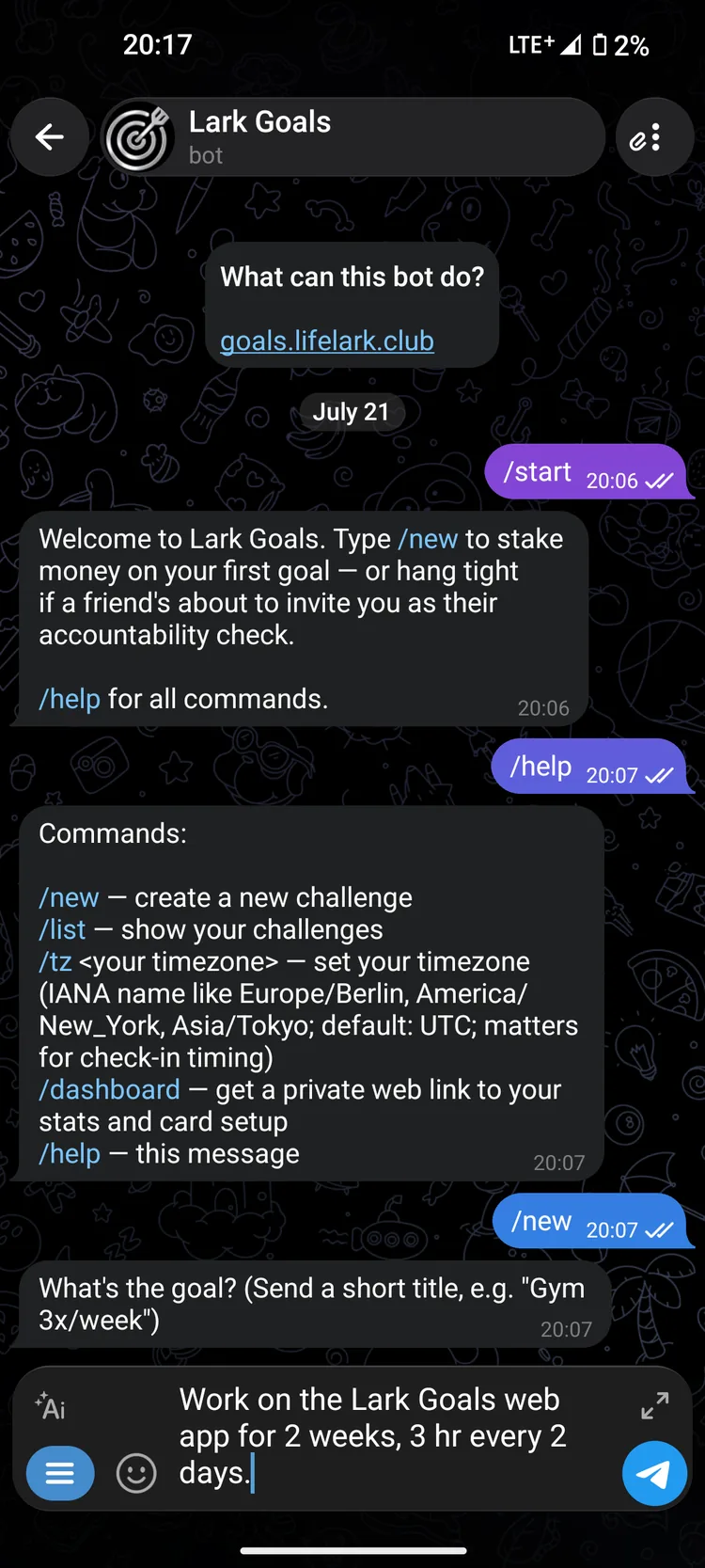
Open the bot on Telegram and send /start. That is the entire signup — no form, no password, no email. Then /new walks you through your first challenge.
Do I need to install an app?
No. Everything happens in Telegram, which you probably already have, plus a browser for the dashboard and for saving your card. There is no Lark Goals app to download.
How do I create a challenge?
Send /new and the bot asks one thing at a time: a title, which weekdays, what time, the start and end date, your stake per check-in, the mismatch multiplier, your target percentage, the two deadlines, and finally who verifies you. You never see or type schedule syntax — you tap weekdays and it reads back as “Mon/Wed/Fri @ 09:00”. /cancel gets you out at any point.
What if I don’t have an approver yet?
Send /skip at the approver step and the bot gives you an invite link to pass on however you like. Until someone accepts it, nothing runs: no check-ins, no prompts, no charges. Nothing is broken and nothing is lost — it is waiting for a person, and the clock only starts once they are in, so your full window survives the wait. You get a weekly reminder with a fresh link. You can also name a @username directly, as long as that person has started the bot once.
What is the dashboard for?
Everything the chat cannot do: saving or updating your card, seeing each challenge with its progress and honesty score, your transaction log, the CSV and PDF export, and pause or delete requests. You reach it with /dashboard. The link is good for ten minutes and you can open it more than once within that window.
Which commands are there?
/new creates a challenge, /list shows the ones you commit to and the ones you verify, /dashboard gets you the private web link, /tz sets your timezone (it decides when your check-ins fire), and /help repeats the list. Two more only work in context: /cancel aborts the challenge wizard, and /skip takes the invite-link route at the approver step.
Still unanswered? The fastest way to see how it behaves is to start one small challenge.
Continue on Telegram